Set Custom Instructions Once and Apply Them to Every ZeroTwo Chat

Reed Vogt
CEO and Head Engineer
We're introducing custom instructions to give you more control over how ZeroTwo responds. Set your preferences once, and ZeroTwo will keep them in mind for all future conversations, eliminating the friction of starting each interaction from scratch.
Custom instructions allow you to add preferences or requirements that you'd like ZeroTwo to consider when generating its responses. Whether you're a teacher, developer, researcher, or professional in any field, custom instructions help ZeroTwo understand your unique context and needs.
Understanding Custom Instructions
We've heard your feedback about the friction of starting each ZeroTwo conversation afresh. Through our conversations with users across diverse fields and industries, we've deepened our understanding of the essential role steerability plays in enabling our models to effectively reflect the diverse contexts and unique needs of each person.
ZeroTwo will consider your custom instructions for every conversation going forward. The model will consider the instructions every time it responds, so you won't have to repeat your preferences or information in every conversation.
For example, a teacher crafting a lesson plan no longer has to repeat that they're teaching 3rd grade science. A developer preferring efficient code in a language that's not Python – they can say it once, and it's understood. Grocery shopping for a big family becomes easier, with the model accounting for 6 servings in the grocery list.
Setting Up Custom Instructions
Setting up custom instructions in ZeroTwo is straightforward and can be done through your user settings. The feature is designed to be accessible to all users, from beginners to advanced professionals.
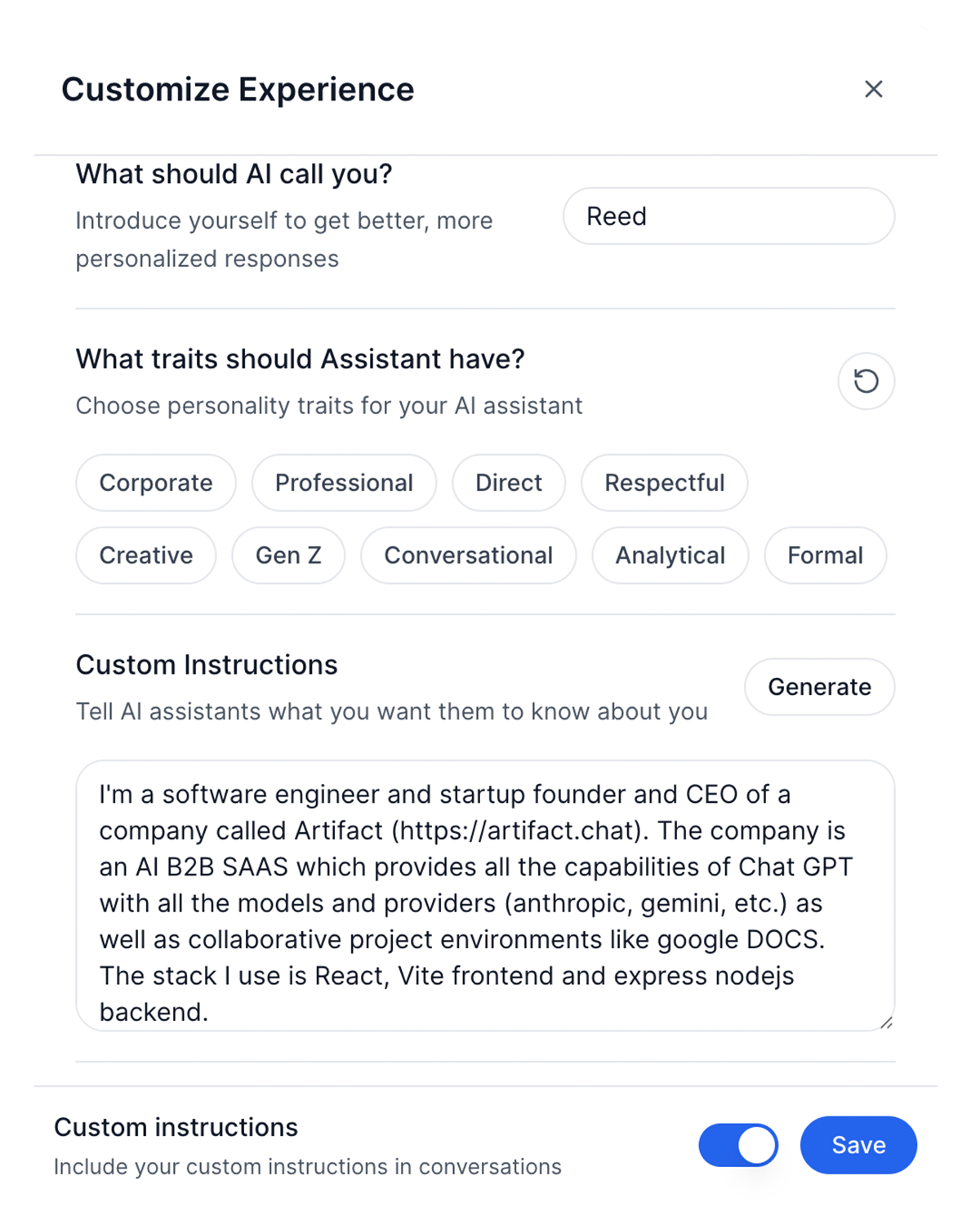
Access and configure your custom instructions through the ZeroTwo settings interface
Accessing Custom Instructions
To set up your custom instructions:
- On web: Click on your profile → Settings → Custom Instructions. Your instructions will be applied to all future conversations.
- On mobile: Go to Settings → Preferences → Custom Instructions. The settings will sync across all your devices.
- Through API: Advanced users can set instructions programmatically through the ZeroTwo API for automated workflows.
Crafting Effective Instructions
The most effective custom instructions are specific, clear, and comprehensive. Consider including information about your role, preferred communication style, technical requirements, and any domain-specific knowledge that should influence responses.
Professional Context Examples:
- Educator: "I'm a high school biology teacher. When discussing scientific concepts, provide age-appropriate explanations with practical examples. Include suggestions for hands-on activities when relevant."
- Software Developer: "I primarily work with React and TypeScript. Prefer functional programming patterns, provide TypeScript definitions, and suggest modern best practices. Assume familiarity with advanced concepts."
- Marketing Professional: "I work in B2B SaaS marketing. Focus on conversion-oriented copy, include data-driven insights, and consider the full customer journey in recommendations."
- Researcher: "I conduct academic research in psychology. Prefer APA citation format, include relevant research limitations, and suggest methodological considerations when appropriate."
Best Practices for Custom Instructions
To maximize the effectiveness of your custom instructions, follow these proven strategies:
Be Specific and Actionable
Avoid vague instructions like "be helpful" or "be creative." Instead, provide specific guidance: "When writing code, include comments explaining complex logic and suggest performance optimizations when relevant."
Getting Started Today
Ready to personalize your ZeroTwo experience? Start by setting up basic custom instructions that reflect your primary role and communication preferences. You can always refine and expand them as you discover what works best for your workflow.
Begin with these three essential elements:
- Professional Context: Describe your role, industry, and primary use cases for ZeroTwo
- Communication Style: Specify how you prefer to receive information (detailed vs. concise, formal vs. casual, etc.)
- Technical Preferences: Include any relevant technical requirements, tools, or constraints that should influence responses
Custom instructions represent a significant step toward truly personalized AI assistance. By understanding your unique context, preferences, and needs, ZeroTwo becomes more than just a general-purpose AI tool—it becomes a personalized assistant that grows and adapts with you.
Related Articles

Introducing ZeroTwo Realtime: Revolutionary Voice Conversations with AI
Experience the future of AI interaction with ZeroTwo's new realtime voice feature. From OpenAI's GPT-4o Realtime to ElevenLabs' expressive voices, discover how to have natural conversations with AI using advanced models, web search capabilities, and intuitive voice selection.

Introducing YouTube Analyzer: Extract, Analyze, and Transform Video Content with AI
ZeroTwo's new YouTube Analyzer tool revolutionizes video content analysis by extracting metadata, transcripts, and comments in seconds. Transform any YouTube video into structured XML data for research, content creation, and AI training.