AI workspace
Keep project context and AI work in one workspace
A useful AI workspace helps you find the source context and the work it produced. In ZeroTwo, begin with a project brief and supported files, use the available models and tools, and inspect the result before handing it off. The tour below shows where each piece sits and which parts you should test before you rely on them.
- projects on every paid plan. Free is limited to 1.
- Unlimited
- memory by plan: Free limited, Plus unlocked, Pro expanded, Ultra maximum.
- Limited to Maximum
- file uploads per task: one on Free, multiple on every paid plan.
- 1 or many
Tour
Take a tour of the workspace
A real ZeroTwo screenshot with six numbered callouts. Only controls that are visible in the image are listed.
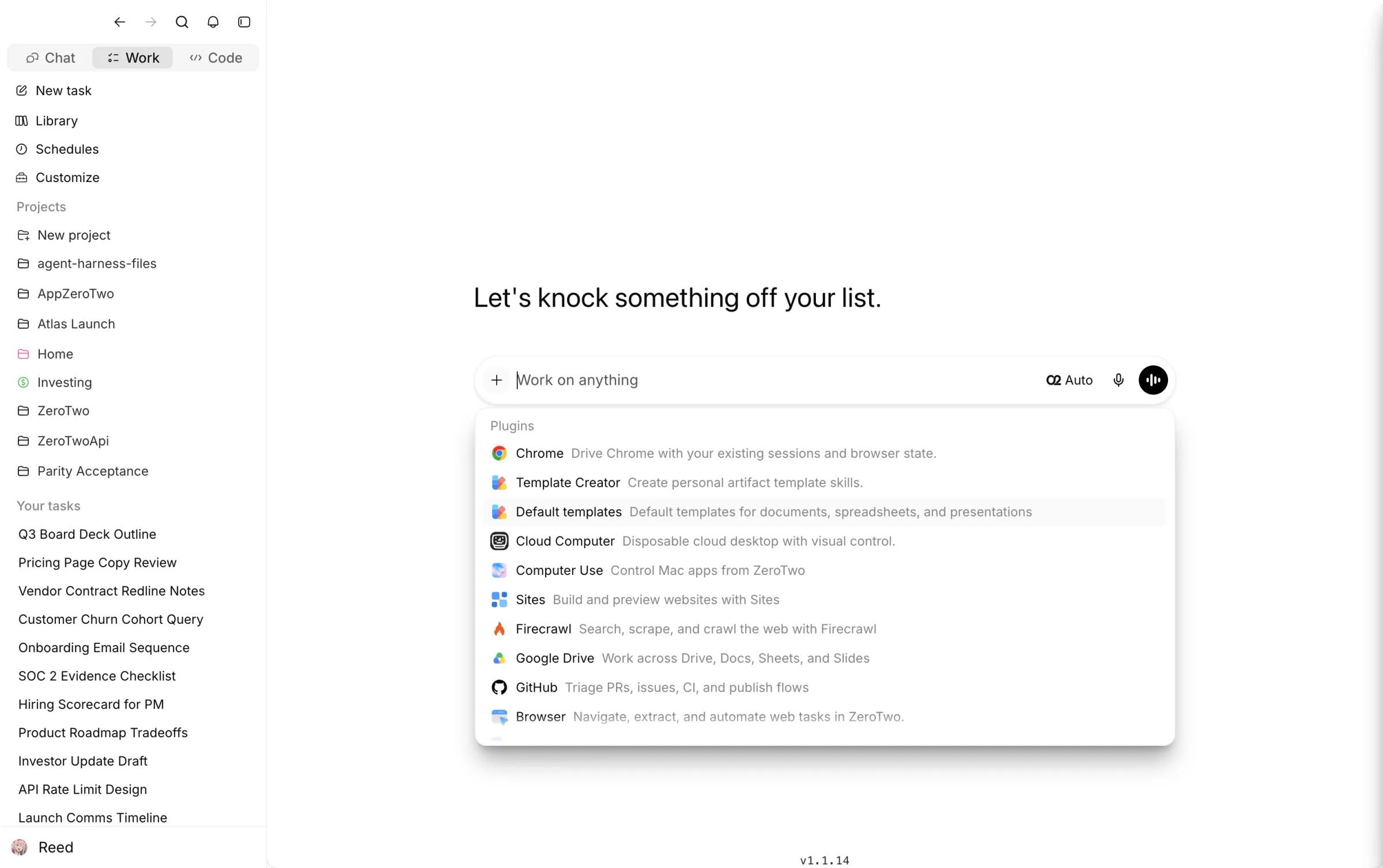
Mode switcher: Chat, Work, Code
Work is where multi-step assignments run.
delegate a multi-step assignmentNew task, Library, Schedules, Customize
The sidebar entries above your projects. What Library stores is something to confirm in your first task.
Projects
Project folders, listed by name. Free is limited to 1 here; paid plans list unlimited.
Your tasks
A list of past tasks. Reopening one is the continuity test in the table below.
Composer with a model selector
The screenshot shows Auto as the selection. Which models you can pick depends on your plan.
choose an available modelPlugin menu
Lists Chrome, Google Drive, GitHub, Firecrawl, Browser, Computer Use, Cloud Computer and Sites in this screenshot.
connect supported tools
Continuity
What context stays with the work?
The honest answer is a table of what we can state, what the plan limits are, and a test you can run for each row. Where this page is silent, the product behaviour is not documented here.
| What | Where it shows up | Plan limits | Verify it yourself |
|---|---|---|---|
| Conversations and tasks | The Your tasks list in the sidebar | Free: 100 free credits to start plus 20 bonus credits every day you log in. Paid plans: monthly credits. | Reopen yesterday's task and ask about a detail from early in it. |
| Project brief and files | Projects in the sidebar | Free: 1 project. Paid plans: unlimited. | Save the brief in a project, start a second task inside it, and check that the second task knows the brief. |
| Uploaded files | Attached to a message or task | Free: one per message. Paid plans: multiple. | Upload your real file types before you plan around them. |
| Memory | A per-account feature, scaled by plan | Free: limited. Plus: unlocked. Pro: expanded. Ultra: maximum. | Ask what it has remembered about you and decide whether that is what you want kept. |
| Generated files | A Library entry sits in the sidebar; this page does not say which outputs it stores | Not stated in the pricing catalog. | Create a file in a task, note where it appears, and keep an exported copy of anything you hand off. |
| Context across a model switch | The model selector in the composer | Model selection widens with plan, from limited to all models. | Switch models mid-task and check the new model still uses the original brief. We do not document this behaviour. |
Plan limits are from ZeroTwo's pricing catalog. For how workspace data is handled, read the privacy policy.
A recurring client project
Organize one project from brief to handoff
Where something lives matters more than how clever the prompt was. This is our suggested structure for a project, not a screenshot of the product.
Suggested structure (illustrative)
- Client project/
- brief.md (audience, output, deadline, constraints)
- sources/ (the files the work may use)
- drafts/ (working versions, dated)
- approved/ (the version that was signed off)
- open-questions.md (what still needs an answer)
Start a report from the same project when the sources are ready: use the AI report generator to create a report from project files.
Centralize the context
Put the brief and supporting material where every task in the project can reach it.
Draft and investigate
Use model choice, web research and the tools on your plan without recreating the assignment in another app.
Review in place
Challenge claims, revise the draft and keep the approval note beside the output.
Export or hand off
Move the approved result into the format your reader needs, and keep a copy of what you sent.
Sharing
Work alone or with other people
"Shared" can mean common context across tasks or several people in one workspace. They are different, and the plans differ.
Individual plans
Free, Plus, Pro and Ultra. The pricing catalog lists no shared workspace for these plans. Your tasks and projects belong to your account, and you hand work to others by sending an exported result, not by co-editing.
Business plan
$39.99 per seat per month. The catalog lists pooled team credits, shared workspaces and shared projects. We do not describe roles, permissions or live co-editing here, so confirm them on the Business page before you build a team process on them.
Integrations
Connect the tools you already use
The plugin menu in the tour lists the connections below. Grant a connection only the access the project needs, and check the integrations page for what each one can do on your plan.
- Chrome
- Google Drive
- GitHub
- Firecrawl
- Browser
- Computer Use
- Cloud Computer
- Sites
See connect supported tools for the integration list, and the connectors page for the apps ZeroTwo connects to.
Our take
Choose a workspace or a single-task tool
ZeroTwo publishes this page, so weigh it accordingly. A workspace is overhead if the job is small.
Pick a workspace if
- The same client or project returns every week.
- Several files, drafts and approvals belong together.
- You switch models for different parts of one assignment.
- You need to answer "where did that number come from?" a month later.
A single-task tool is enough if
- It is a one-off question or a short draft.
- There are no source files to keep.
- Nobody will ask you to reopen the work.
- You only need a delegated run and not a place to keep it: see the AI agent platform.
Workspace questions
What is saved between sessions?
Tasks and projects appear in the sidebar, and every plan has a memory feature, from limited on Free to maximum on Ultra. This page does not list exactly what is indexed or recalled, so use the table above to test it on your own project.
Does switching models preserve the same context?
You pick a model from a selector in the composer. We do not document how context carries across a mid-conversation switch. Test it on a small task, and if something is lost, restate the brief or keep it in the project.
Can teammates see or edit my work?
The pricing catalog lists no shared workspace for Free, Plus, Pro or Ultra. Business lists pooled team credits, shared workspaces and shared projects. This page does not describe roles, permissions or live co-editing, so check the Business page and the app before assuming them.
Where do generated files live?
The sidebar has a Library, but this page does not state which outputs it stores. Create a file in a task, note where it appears, and keep an exported copy of anything you hand off.
How can I export or remove project data?
Export formats are not documented on this page. Ask the help center for the format you need, read the privacy policy for how data is handled, and use the delete account page if you want your account removed.
Data questions: privacy policy, delete account and the ZeroTwo Help Center guide to how ZeroTwo handles your data.