A field guide to AI image edits
AI image editing: seven kinds of edit, and how to ask for each
AI image editing changes a picture you already have instead of making a new one. Name the kind of edit first, then choose the model and write the prompt. This guide covers seven kinds of edit, where each tends to fail, two real before-and-after examples, and the seven ZeroTwo models that accept an image to edit.
What this page can and cannot show
Real examples, thin provenance. The before-and-after pairs come from the example gallery on ZeroTwo's image generation page. It records the prompt, not the model, and each pair is one result, not a test.
No mask tool is documented here. The prompts below describe regions in words so they do not depend on one. Use a brush mask if your tool offers it.
Specialist tools are alternatives. An earlier version listed systems such as SUPIR and PuLID as available on ZeroTwo. They are not in ZeroTwo's model list and appear below only as outside examples.
An editor starts from your picture
The difference decides which model and which prompt you want. Image generators are compared on their own terms in the image generator guide.
Image generator
- Input
- A text prompt
- The prompt describes
- The whole scene, from scratch
- Typical failure
- Wrong subject, invented detail
- Reach for it when
- You have no source image
Image editor
- Input
- A source image and an instruction
- The prompt describes
- The change, and what to keep
- Typical failure
- Changes leak, identity drifts, seams show
- Reach for it when
- You have a photo and want one thing different
Seven kinds of edit
This is a working taxonomy for this page, not an industry standard, and real edits often chain two or three of these. Each card says what the edit is for, how it usually fails, how to ask for it, and which specialist tools exist outside ZeroTwo.
Inpainting
Replace or remove one region and leave the rest alone.
- Good for
- Removing a stranger or a blemish, swapping a small object.
- Usually fails by
- Changes leak outside the region, texture or light does not match, faces drift.
- How to ask
- Say what to remove or replace and where, then list what must stay unchanged.
- Outside ZeroTwo
- Dedicated inpainting models with a brush mask, for example FLUX.1 Fill.
Outpainting
Extend the canvas past the original frame.
- Good for
- A new aspect ratio, more headroom, a banner from a square.
- Usually fails by
- Visible seams, repeated textures, invented subjects.
- How to ask
- Ask the backdrop to continue, not for new subjects. Name the target ratio.
- Outside ZeroTwo
- Editors with an expand-canvas tool.
Cut-out edits
Isolate a subject or region, then recolour, replace or extract it.
- Good for
- Background swaps, recolouring one object, sticker cut-outs.
- Usually fails by
- Halos around hair and fur, rough edges in clutter.
- How to ask
- Describe the subject to keep and the new background. Match light direction and warmth.
- Outside ZeroTwo
- Segmentation models such as Segment Anything 2 and dedicated background removers.
Style transfer
Re-render the same content in another look.
- Good for
- Photo to watercolour, anime or pointillism.
- Usually fails by
- Structure drifts and detail is lost. A whole-image restyle is a re-render, not a filter.
- How to ask
- Name the style and say what to preserve: pose, composition, expression.
- Outside ZeroTwo
- Style-reference features in other generators.
Upscaling and restoration
Raise resolution and recover or invent fine detail.
- Good for
- Print enlargements, old scans.
- Usually fails by
- Invented detail, plastic skin, altered faces.
- How to ask
- Ask for faithful enlargement with no new elements, then check faces at 100%.
- Outside ZeroTwo
- Dedicated upscalers such as Topaz Gigapixel or SUPIR. A general edit model can re-render detail, so use one of these when fidelity matters.
Generative insert
Add an object that was not in the photo and make it belong.
- Good for
- A product in a lifestyle scene, staging, extra props.
- Usually fails by
- Wrong light direction, wrong scale, missing shadow or reflection.
- How to ask
- Say where it goes, how big it is next to something in the scene, and where the light comes from.
- Outside ZeroTwo
- Workflows built around a reference-image adapter.
Identity-preserving re-render
Change pose, outfit, lighting or setting while the subject stays recognisably the same.
- Good for
- Same person in a new outfit, same product in new scenes.
- Usually fails by
- Subtle face drift, changed gaze, altered clothing details.
- How to ask
- List the features that must not change (face, hair, eye colour) before saying what should.
- Outside ZeroTwo
- Face-consistency tools such as PuLID and InstantID.
Two real edits, and what they teach
Both come from ZeroTwo's own example gallery. They show what a single edit keeps and what it changes; they are not a benchmark, and the gallery does not say which model made them.
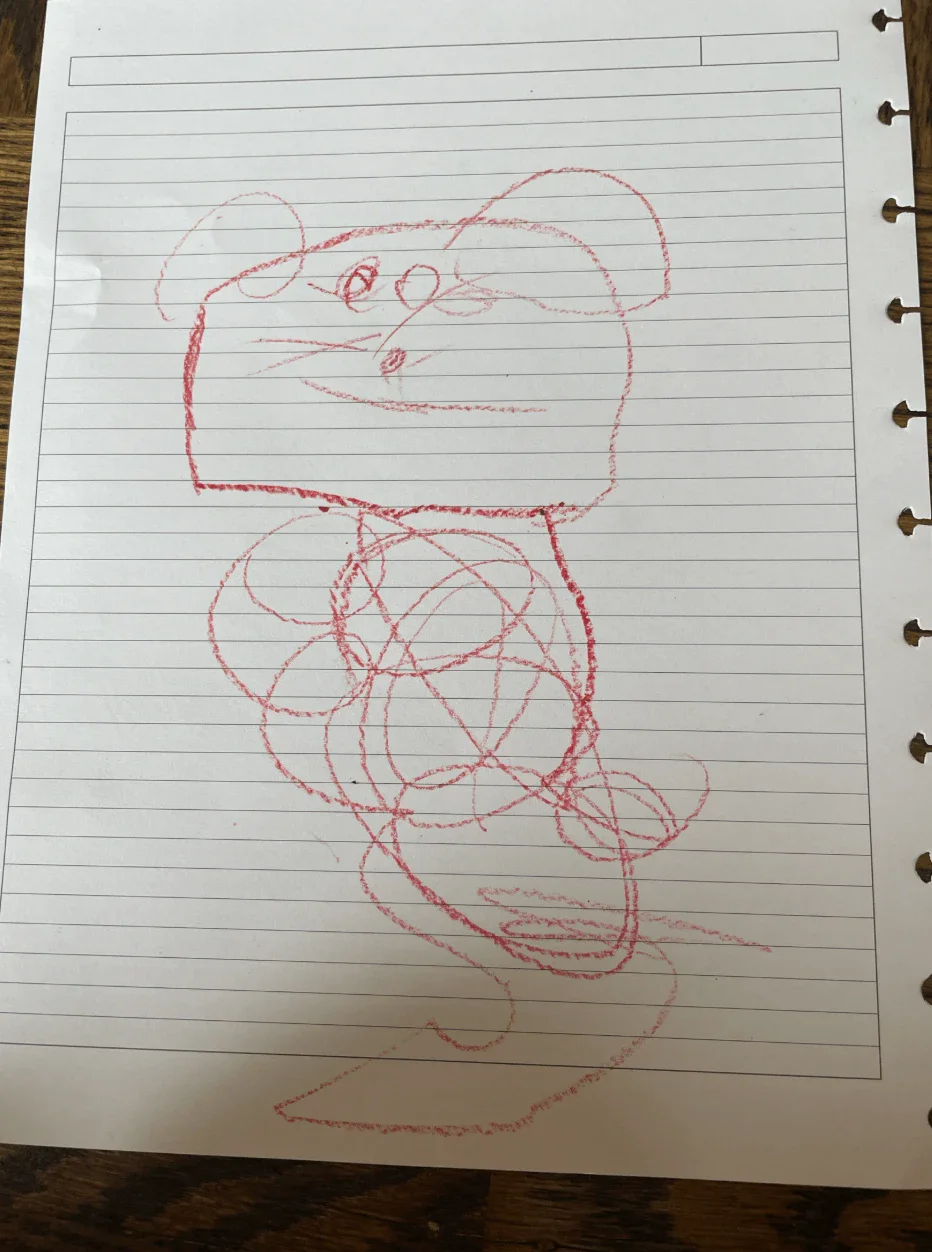
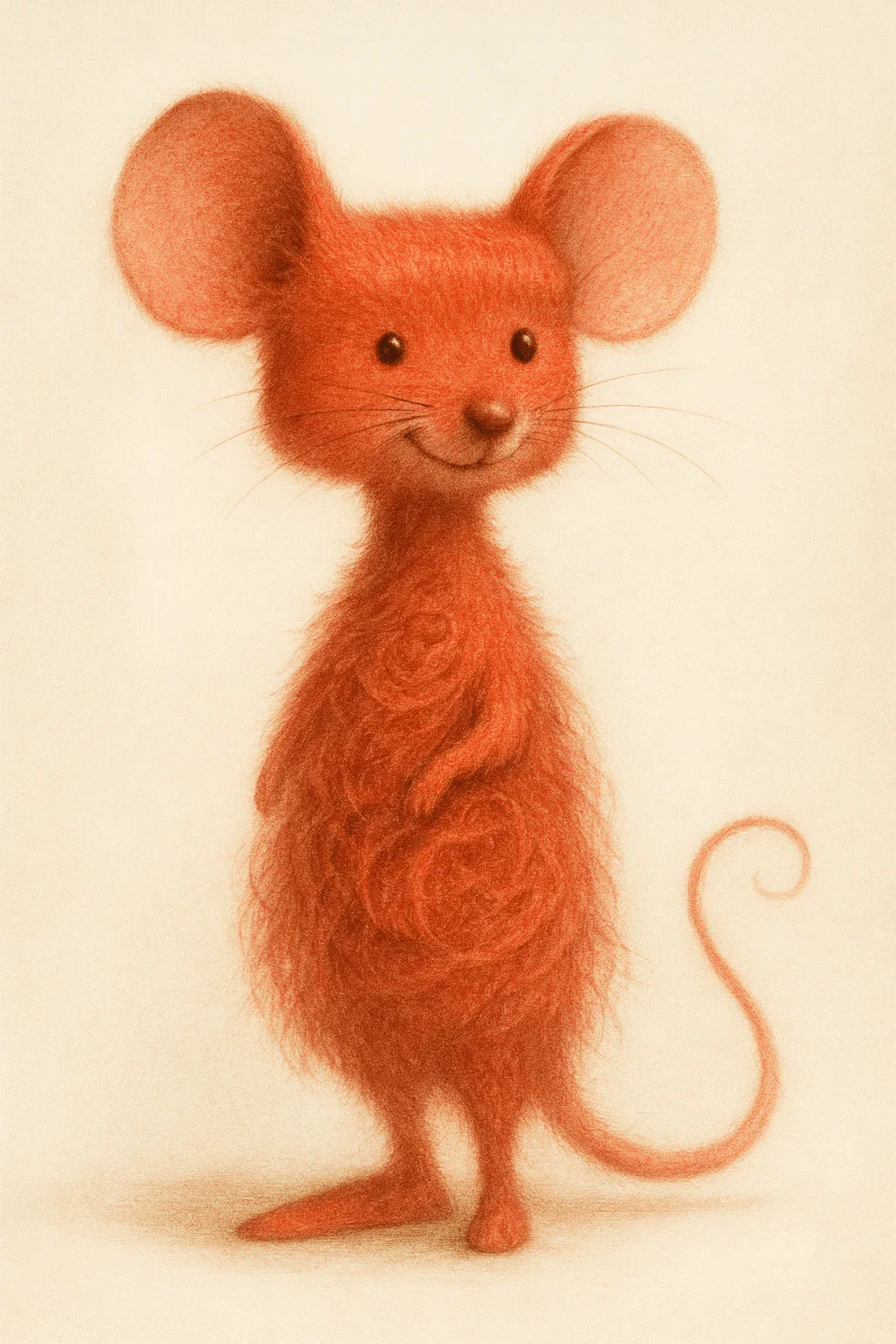
A crayon drawing, made lifelike
- Kept
- The round ears, the smile, the upright front-facing pose and the red-orange colour.
- Changed
- Body proportions and the scribbled torso became fur. Whiskers and a curled tail appeared, and the lined paper was replaced by a plain cream ground.
A sunset photo, restyled
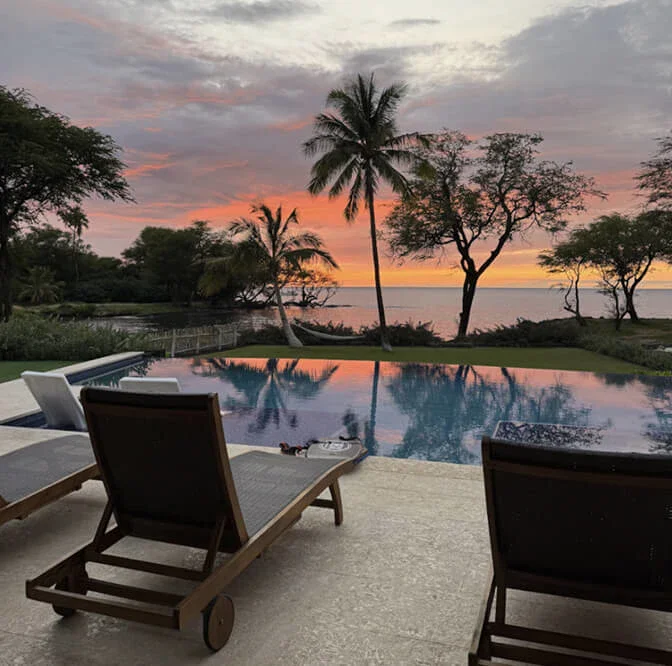
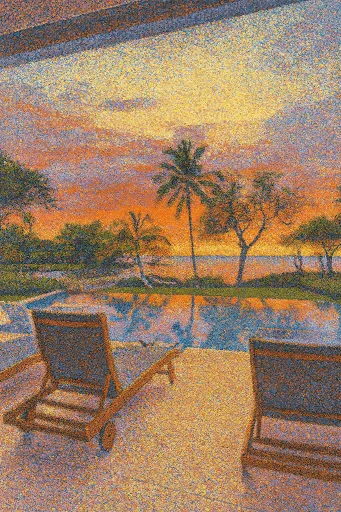
- Kept
- The sunset palette, the palm trees, the pool reflection and the loungers.
- Changed
- The framing: the output is portrait while the source is near-square, and the chairs, pool edge and trees sit in different places. A stipple texture covers everything.
The lesson from the second pair: a whole-image restyle is a re-render, not a filter. When the composition must stay exact, ask for a narrower edit and list what to preserve. More example prompts live on the image generation feature page.
The seven ZeroTwo models that take an image to edit
The list is taken from this site's code, and the in-app picker is current. Next to each is its closest entry on Artificial Analysis's editing board, checked 5 October 2026.
| Edit-capable in ZeroTwo | Maker | Closest board entry | Rank of 80 | Elo (95% interval) | Note |
|---|---|---|---|---|---|
| GPT Image 1.5 | OpenAI | GPT Image 1.5 (high) | 12 | 1102 ± 8 | Name match. |
| Nano Banana Pro | Nano Banana Pro (Gemini 3 Pro Image) | 13 | 1099 ± 8 | Name match. Ranks 12 and 13 overlap, so treat them as a tie. | |
| Flux Pro 2 | Black Forest Labs, via FAL | FLUX.2 [pro] | 41 | 1007 ± 7 | Closest entry. We cannot confirm which FLUX.2 variant ZeroTwo calls Flux Pro 2. |
| Nano Banana | Nano Banana (Gemini 2.5 Flash Image) | 50 | 986 ± 9 | Name match. | |
| GPT Image 1 | OpenAI | GPT Image 1 (high) | 53 | 979 ± 7 | Name match, listed at its high setting. |
| GPT Image 1 Mini | OpenAI | GPT Image 1 Mini (medium) | 66 | 923 ± 7 | Name match, listed at its medium setting. |
| Qwen Edit | Alibaba | Qwen Image Edit | 68 | 918 ± 7 | Closest entry. The board lists several Qwen edit versions; we cannot confirm which one ZeroTwo uses. |
The top of the board
GPT Image 2.5 Sunburst (max) leads at 1182, then GPT Image 2.5 Flare (max) at 1162, MAI-Image-2.6 at 1137, MAI-Image-2.6-Flash at 1126 and GPT Image 2 (high) at 1122. None of them is in ZeroTwo's edit-capable list.
What the board measures
Blind votes on edited outputs from the same input and instruction. It captures general preference, not mask precision or how well a face is kept, so use it to shortlist and then test your own edit.
Plans and scope
Free is limited; Plus ($14.99/mo) and Pro ($29.99/mo) include image generation. See plans. To compare editing products by task, see the AI photo editor comparison.
Source: Artificial Analysis, AA-Image-Editing v2.0, read 5 October 2026. Matches marked "closest" are our judgement, not Artificial Analysis's.
From what you want to the edit type
Eight common jobs, the kind of edit each one is, a sensible first move and what to try when it goes wrong. For bulk jobs, see the batch photo editing comparison.
Remove a stranger from a holiday photo
Inpainting
First moveName the person and where they stand, then list what must stay unchanged.
If it goes wrongOne change per turn. If your tool offers a brush mask, use a tight, slightly soft one.
Turn a square crop into a 16:9 banner
Outpainting
First moveAsk the existing backdrop to continue left and right; add no subjects.
If it goes wrongExtend in smaller steps, or crop tighter first so there is less to invent.
Swap a beach background for a studio backdrop
Cut-out edit
First moveSay to keep the person exactly as they are, then describe the new backdrop and its light.
If it goes wrongCheck hair edges at 100%. Fine fur and flyaway hair are where halos appear.
Make a photo look like a watercolour
Style transfer
First moveName the style and say to keep pose and composition exactly.
If it goes wrongIf the layout still drifts, accept it as a re-render and pick the version closest to the original.
Enlarge a 1024px headshot for print
Upscaling
First moveUse a dedicated upscaler when fidelity matters. Compare free upscalers.
If it goes wrongCheck eyes, teeth and skin at 100%. Invented detail shows up there first.
Put a sneaker on a marble countertop
Generative insert
First moveAttach a clear product photo, say where it sits, how big it is and where the light comes from.
If it goes wrongName the shadow direction explicitly. A wrong shadow is the quickest giveaway.
Same person, new outfit
Identity-preserving
First moveList face, jawline, eye colour and hairstyle as fixed, then describe only the clothing.
If it goes wrongShorten the list of changes. Identity drifts more the more you ask for at once.
Restore a faded family photo
Restoration, then inpainting
First moveChain two edits: restore tone and detail first, then fix scratches or tears.
If it goes wrongKeep the original scan. Compare faces against it before you accept a result.
Six prompt templates
These are templates to adapt, not recorded outputs. Edit prompts work better when they say what to keep than when they only say what to change.
Remove a person
InpaintingRemove the person standing at the far left of the frame, next to the lamp. Fill the space with the surrounding background so it looks as if they were never there. Keep everything else unchanged: lighting, colour grade, framing and every other person. No text, no logos.
Why: It says what to keep as well as what to remove, and it locates the region in words so it does not depend on a mask tool.
Extend to 16:9
OutpaintingExtend this image to a 16:9 landscape format by continuing the existing studio backdrop to the left and right in the same grey gradient. Keep the subject exactly as it is, keep the depth of field and film grain consistent, and add no new subjects.
Why: Extensions fail when you ask for new content. Restricting the request to backdrop continuation is safer.
Photo to watercolour
Style transferRe-render this photo as a loose watercolour with visible paper texture and soft bleeding edges. Keep the pose, expression and composition exactly as they are.
Why: The explicit keep-list guards against structural drift, which is what the pointillism example above shows.
Same person, new outfit
Identity-preservingKeep this person's face, jawline, eye colour and hairstyle identical. Change only the clothing to a tailored navy blazer over a white oxford shirt. Soft studio light from camera left.
Why: Face drift comes from an under-specified keep-list, so name the features before the change.
Place a product in a scene
Generative insertAdd the product from the attached reference image onto the marble countertop, centred. The light comes from the window at upper right, so cast its shadow to the lower left and add a faint reflection on the marble. Keep it about the size of a real shoe next to the glass.
Why: Naming the light source and the scale gives the model what it needs to make the object belong.
Swap the background
Cut-out editKeep the person exactly as they are and replace the background with a softly out-of-focus city street at golden hour. Match the light on the person to a warm late-afternoon colour and add a faint warm rim light on their left shoulder.
Why: Matching light and colour temperature is what separates a believable composite from a cut-out.
When the edit comes out wrong
Five questions, ordered cheapest to fix first.
Did you name the edit type first?
If you are fighting a general tool with an edit it was not built for, say inpainting for an upscaling job, the fix is a different approach, not a longer prompt.
Is the request one change?
Several changes in one turn compete. Do them one at a time and keep the version you like.
Did you say what to preserve?
Identity, colour and composition drift when the keep-list is missing. Add 'keep the face', 'keep the colour grade' or 'keep the composition'.
Is the region clear?
If your tool has a mask, make it tight and slightly soft-edged. If it does not, locate the region by position and neighbours, such as 'the person at the far left, next to the lamp'.
Is this a model limit?
Try another of the seven edit-capable models. If it still fails, finish the last stretch in a layered editor; that is a normal workflow, not a defeat.
Good practice
Check at full size
Edits that look fine as a thumbnail often show seams, hands or text errors at 100%.
Disclose where it matters
Where an audience would expect an unedited photo, such as news, evidence or a product listing, say the image was edited.
Do not strip other people's marks
Using an edit to remove a watermark or copyright notice from an image you do not own, in order to reuse it, can be unlawful in many places. This is general information, not legal advice.
Frequently asked questions
What is AI image editing?
AI image editing uses image models to change a picture you already have, for example removing an object, swapping a background, restyling it or enlarging it, instead of generating a new picture from text alone. It always starts from a source image plus an instruction.
What is the difference between AI image editing and AI image generation?
A generator makes a picture from a text prompt. An editor takes a source image and an instruction and changes it. The same model can sometimes do both, but they are judged separately: on Artificial Analysis the generation and editing boards have different leaders and different orders for the same models.
Which ZeroTwo models can edit an image?
The edit-capable list in this site's code has seven models: GPT Image 1.5, GPT Image 1 and GPT Image 1 Mini from OpenAI; Nano Banana and Nano Banana Pro from Google; Flux Pro 2 from Black Forest Labs, served through FAL; and Qwen Edit from Alibaba. The picker in the app is the current source of truth, and what you can use depends on your plan.
Is AI image editing free in ZeroTwo?
ZeroTwo's Free plan includes limited image generations. Plus ($14.99/month) and Pro ($29.99/month) include image generation. This site's plan data does not break out editing separately, so run a test edit to see what your plan allows before you rely on it.
Can AI image editors replace Photoshop?
For quick, local changes, such as removing a distraction, changing a background or trying a style, an instruction-driven editor is often faster. For precise compositing, colour-managed print work or layered brand files, a layered editor is still the better tool. In practice many people use both, and that is our opinion rather than a measured result.
Is it legal to use AI to remove a watermark from an image?
Removing a watermark or copyright notice from someone else's image so you can reuse or redistribute it can be unlawful in many places. Cleaning up your own photos, scans of public-domain works or assets you are licensed to edit is a different matter. This is general information, not legal advice; ask a lawyer about your situation.
Keep exploring
- Best AI photo editor
Compare photo-editing products by task.
- Best AI photo batch editor
Bulk workflows for hundreds of photos.
- Best free AI upscaler
Enlarge images faithfully for print and 4K.
- Best AI image generator
A dated leaderboard snapshot and a job-by-job guide.
- Text-to-image prompt cookbook
When you are starting without a source image.
- Free AI image generators
Quotas, watermarks and licences for no-cost tiers.
- AI image to video
Turn an edited image into a short clip.
- Image generation in ZeroTwo
The feature page, with example prompts.
Broader questions: how ZeroTwo compares as a single workspace is covered in the best all-in-one AI platform guide, the chat side in ZeroTwo's AI chat, and the text models in AI models for text generation.