From drawing to image

Sketch to photo converter: what survives the redraw

Upload a drawing to ZeroTwo, describe the finished image, and an image model redraws it. Below: a real drawing and its result, an honest read of what carried over and what did not, and how the underlying techniques differ.

Free plan, no card required. Image generation is limited on Free; see pricing.

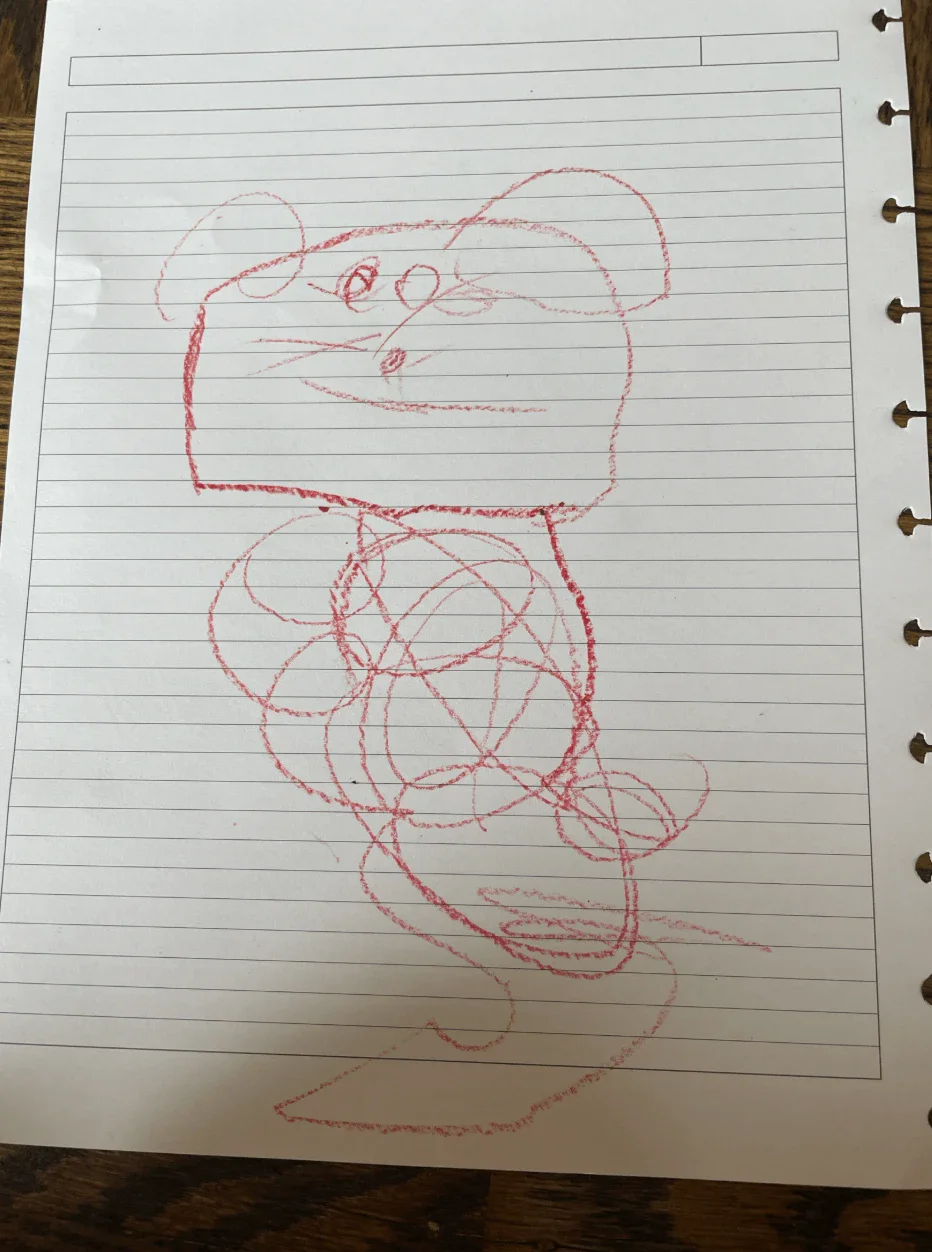
A red crayon drawing on lined notebook paper of a mouse-like character with a boxy head, round ears, whiskers and a smile, standing on a body drawn as overlapping loops.
Input: crayon drawing
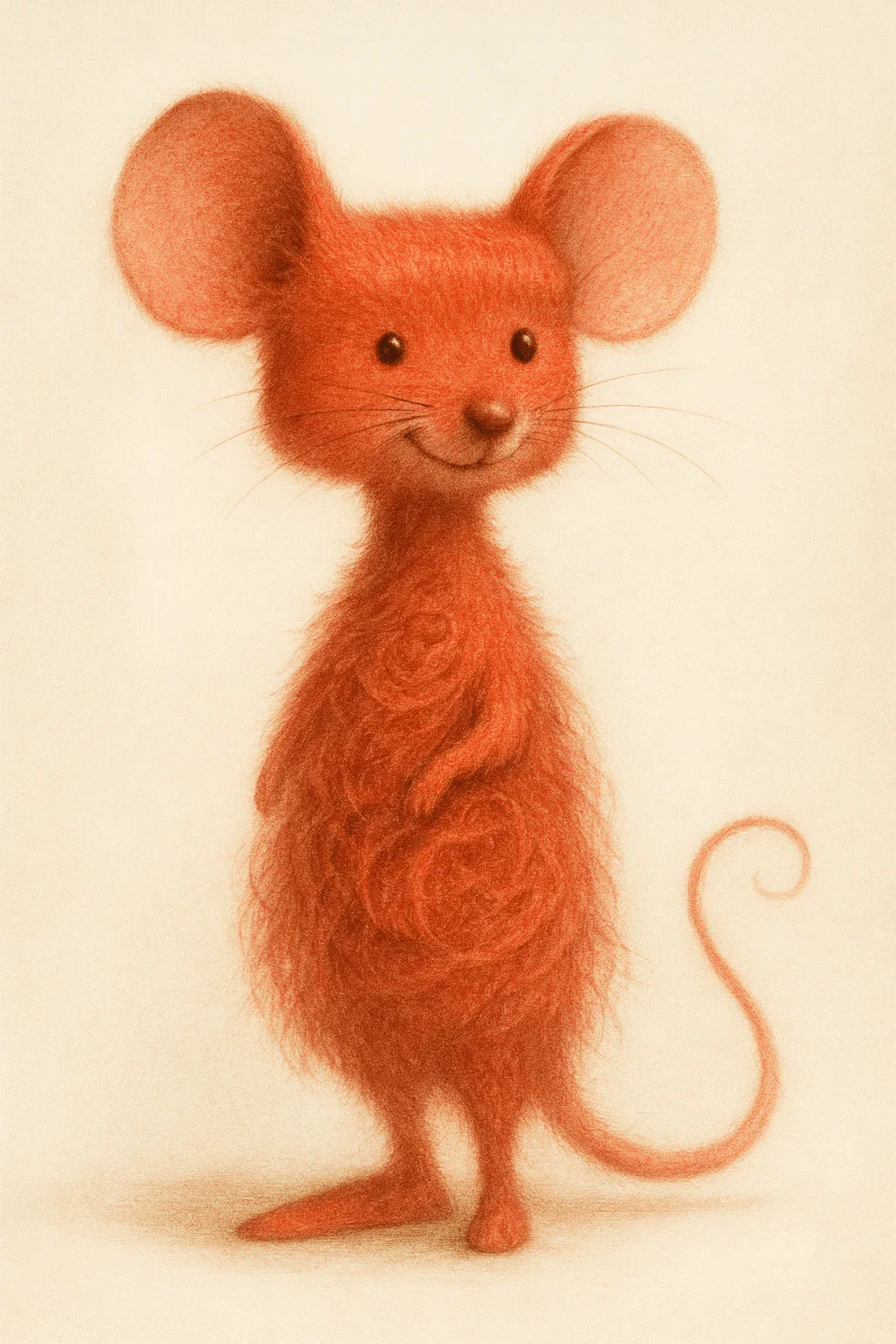
A soft, pencil-textured illustration of a fluffy orange-red mouse standing upright with large round ears, small dark eyes, whiskers, a smile, folded paws and a curling tail, on a plain cream background.
Result: realistic version

From ZeroTwo's own image-generation gallery. Which model made it is not recorded there.

Do you need line control, or just a good reading of the drawing?

Two different jobs hide behind the same search. Decide which one you have before you pick a tool.

A reference image plus a prompt is enough when

  • You want the idea of the drawing rendered well, not every stroke traced.
  • The subject and composition matter more than exact line positions: character concepts, mood frames, rough product ideas.
  • You are happy to iterate by changing the wording or the model.

You need explicit line control when

  • Part counts and positions are the deliverable: a floor plan elevation, a labelled product draft, a comic panel layout.
  • You can run a pipeline that takes an edge, scribble or depth map as a separate input (the ControlNet family).
  • You accept the set-up cost: those tools are separate software that you run yourself.

One real drawing, read closely

The two images above, compared piece by piece. The prompt was:

Create a realistic version of this drawing, paying attention to the details to create a lifelike drawing.

Kept: the face and the pose

The flat-topped, boxy head, the two big ears at the upper corners, two small eyes, a nose, sets of whiskers and the wide smile all carry over, as does the upright stance.

Drawing, head: close-up crop of the image above
Drawing, head
Result, head: close-up crop of the image above
Result, head

Reinterpreted: the scribbled body

The tangle of loops became fur with swirl curls, and the model added folded paws and a curling tail. Nothing in the drawing says fur; the model decided that.

Drawing, body: close-up crop of the image above
Drawing, body
Result, body: close-up crop of the image above
Result, body

Dropped: the page it was drawn on

The ruled lines, the binder holes and the table edge are gone. The result sits on a plain cream background. That is usually what you want, and it is also a reminder that the model redraws the whole image rather than tracing the lines.

Changed: color, medium and frame

Red crayon became warm orange-red with a soft pencil texture, so the result reads as a rendered illustration, not a photograph. The prompt only asked for a realistic version. The frame also changed shape.

Drawing file
932 × 1252 px, about 3:4
Result file
1024 × 1536 px, 2:3

What this example does not show

  • One drawing and one result. It shows what can happen, not what usually happens.
  • The model used is not recorded in the gallery, so it says nothing about any one model.
  • No timing, no repeat runs and no other settings were captured.

Four ways software turns a drawing into an image

Search results mix these together. They give different amounts of control, so the row you are in decides what to expect.

Four methods for turning a drawing into an image, compared by what the model is given, what tends to survive and where you meet each method.
MethodWhat the model is givenWhat tends to surviveWhere you meet it
Reference image plus text promptThe route on this pageYour drawing as an input image, plus instructions in plain language.Subject and composition. Exact stroke positions are not guaranteed, and you steer by wording (what to keep, what to add).Image-edit models, including those listed further down this page.
Image-to-image (img2img)Your image, encoded and partly noised, then denoised under the prompt.Set by the strength parameter: lower values stay closer to the original, and 1.0 mostly ignores it.Open-source pipelines such as Hugging Face Diffusers. Not claimed for ZeroTwo on this page.
ControlNet with a conditioning mapA separate map made from your drawing (scribble, Canny edges, depth, segmentation or pose) next to the prompt.The information in the map. This is the route to keep lines in place.Self-run tools built on the ControlNet code and models. Not claimed for ZeroTwo on this page.
Text prompt onlyWords and no drawing.Nothing from a drawing, because none is supplied.A different job. See AI image generator from text.

Technique descriptions come from Hugging Face Diffusers: image-to-image guide, ControlNet paper, arXiv:2302.05543, and ControlNet repository README, read on 5 October 2026.

Run your own fidelity test in five steps

The only result that matters is your drawing's. Use the same sketch for every attempt so the comparison is fair, and see image generation in ZeroTwo for the upload flow. If your drawing is a room plan, the AI interior design page shows how a concept sketch feeds a room redesign.

  1. Prepare the drawing

    Photograph it straight on in even light, crop to the artwork and raise the contrast so dark lines read clearly against the paper. Pencil and pale pen fade first, so go darker than looks natural.

  2. Say what to keep

    Name the parts that must not move: the head shape, the roofline, the label positions. A sentence that begins with Keep gives the model a constraint instead of leaving it to guess.

  3. Say what to add

    Material, lighting and camera feel are what a drawing cannot hold. If you want a photograph, ask for photographic traits: our example prompt only asked for realistic and came back as an illustration.

  4. Compare at the same size

    Open both at the same scale and flip between them. Check part counts, proportions, where the main lines landed and the frame shape, since the aspect ratio can change.

  5. Change one thing per attempt

    Edit the wording or switch the model, not both at once, so you can tell which change helped.

Prompts that say what to keep

Starting points to adapt, not tested outputs. Each one pairs a Keep clause with an Add clause, then names what to check.

Product from a rough draft

Studio product photograph of [PRODUCT], based on the attached drawing. Keep the silhouette, proportions and the position of every labelled part. Add a matte ceramic finish, soft three-point softbox light, a seamless grey backdrop and an 85mm lens look.

Check afterButton, label and logo positions.

Building from a concept sketch

Photorealistic exterior of the building in the attached sketch. Keep the massing, the roofline and the window grid exactly. Add polished concrete and brushed steel, golden-hour light and a wide-angle lens look.

Check afterNumber of stories and window bays.

Character from line art

Render the attached line drawing as a lit portrait photograph. Keep the pose, the face shape and the hair silhouette. Add rim light, shallow depth of field and fine film grain.

Check afterFace proportions, hands and any accessories.

Storyboard frame to a still

Turn this storyboard frame into a cinematic still. Keep the camera angle, the subject placement and the horizon line. Add dramatic backlight and a 2.39:1 frame.

Check afterAspect ratio. You may need to crop.

Image models ZeroTwo lists as edit-capable

These accept an input image with your instructions. We have not run one sketch through all of them, so we do not rank them: try your drawing on two and keep the better reading. Which ones your plan includes is on the pricing page, and the wider catalog is under models.

  • GPT Image 1.5OpenAI
  • GPT Image 1OpenAI
  • GPT Image 1 MiniOpenAI
  • Nano BananaGoogle
  • Nano Banana ProGoogle
  • Qwen EditQwen
  • Flux Pro 2Flux

Sketch to photo questions

What is a sketch to photo converter?

It is an AI image tool that takes a drawing as input and returns a more finished image that follows its subject and composition. How closely it follows your lines depends on the method: a reference image with a prompt follows loosely, while a conditioning map such as a ControlNet edge or scribble map is built to hold structure in place.

How does AI turn a sketch into a photo?

In image-to-image generation the drawing is encoded, noise is added to it, and the model removes that noise while following your prompt. A strength setting controls how far the result may drift: lower stays closer to the original and 1.0 more or less ignores it. ControlNet adds a separate conditioning image, such as a canny edge map, a depth map or a scribble, and the generated image preserves the information in it.

Does ZeroTwo have Canny, Scribble or Depth ControlNet modes?

This page does not claim that. What ZeroTwo's own image-generation examples show is a drawing uploaded as an image with a text instruction, handled by an image-edit model. If you need explicit edge or depth control, ControlNet is open-source software that you run yourself.

Do I need a GPU to convert sketches to photos?

Not for a hosted tool: the provider runs the model on its own servers. Running ControlNet yourself does need a GPU; the repository documents a low-VRAM mode for 8 GB cards. Check the hardware notes for the specific model you pick.

Can I convert a hand-drawn pencil sketch?

Yes, as an uploaded image. Practical advice rather than a tested rule: photograph it straight on, crop to the artwork and increase the contrast first, since faint pencil is the first thing to disappear. Then say in the prompt which parts must stay put.

Can I use the result commercially?

That depends on the model provider's current terms and on your plan, and this page does not summarize licenses. Read the provider's terms before you publish client or brand work, and keep a record of which model made the image.

What does image generation cost in ZeroTwo?

Image generation is limited on the Free plan ($0, no card required) and is included on Plus ($14.99/month) and Pro ($29.99/month, $26.99/month billed annually). Which image models each plan includes, and the credit allowances, are on the pricing page.
Upload your own drawing and compare the result with the original

Open ZeroTwo