ZeroTwo 2.0 shipped on November 22, 2026, on the web and in the desktop app. It changes four things you will notice. New accounts start on a guided setup that ends with a task ZeroTwo really runs. Cloud Code tasks in the desktop app can push their work and open a pull request. Agent steps read as one status line per turn, and long chats open and scroll with less work. The ZeroTwo 2.0.0 release notes list every change.
Releases 2.0.2 and 2.0.3 followed on November 23. They fixed computer use on Windows, shell approvals in Work on Windows, and card checkout, as the ZeroTwo changelog records. As of November 24, the web app runs 2.0.3, and desktop 2.0.3 is available for Mac with Apple silicon, Windows, and Linux.1 New accounts get the setup as part of sign-up. Cloud Code is open to every plan in the desktop app, and its runs draw credits like any Work task.2
Two limits sit beside the news. Accounts that existed before 2.0 never see the setup, and Code, on your computer or in the cloud, is in the desktop app only. The web app offers Chat, Work, and Design.2
New accounts finish setup by watching a task complete
A new account's first question is what ZeroTwo can do. In 2.0, a new account lands on a short guided setup right after sign-up, on the web and in the desktop app.3 ZeroTwo greets you by name, asks what kind of work you do, and starts a Getting started list for that role. You can skip it at any point.
The setup then offers a starter task. On the web there are three: turn a sample spreadsheet into a chart, schedule a 30-minute focus block on your Google or Outlook calendar, or send yourself a Slack message. The desktop app adds a note on your Desktop and, on a Mac, a switch between light and dark mode with a button to switch it back. The four screens below are one run of the setup on app.zerotwo.ai on November 24, from the role question to the list it left in the sidebar.4
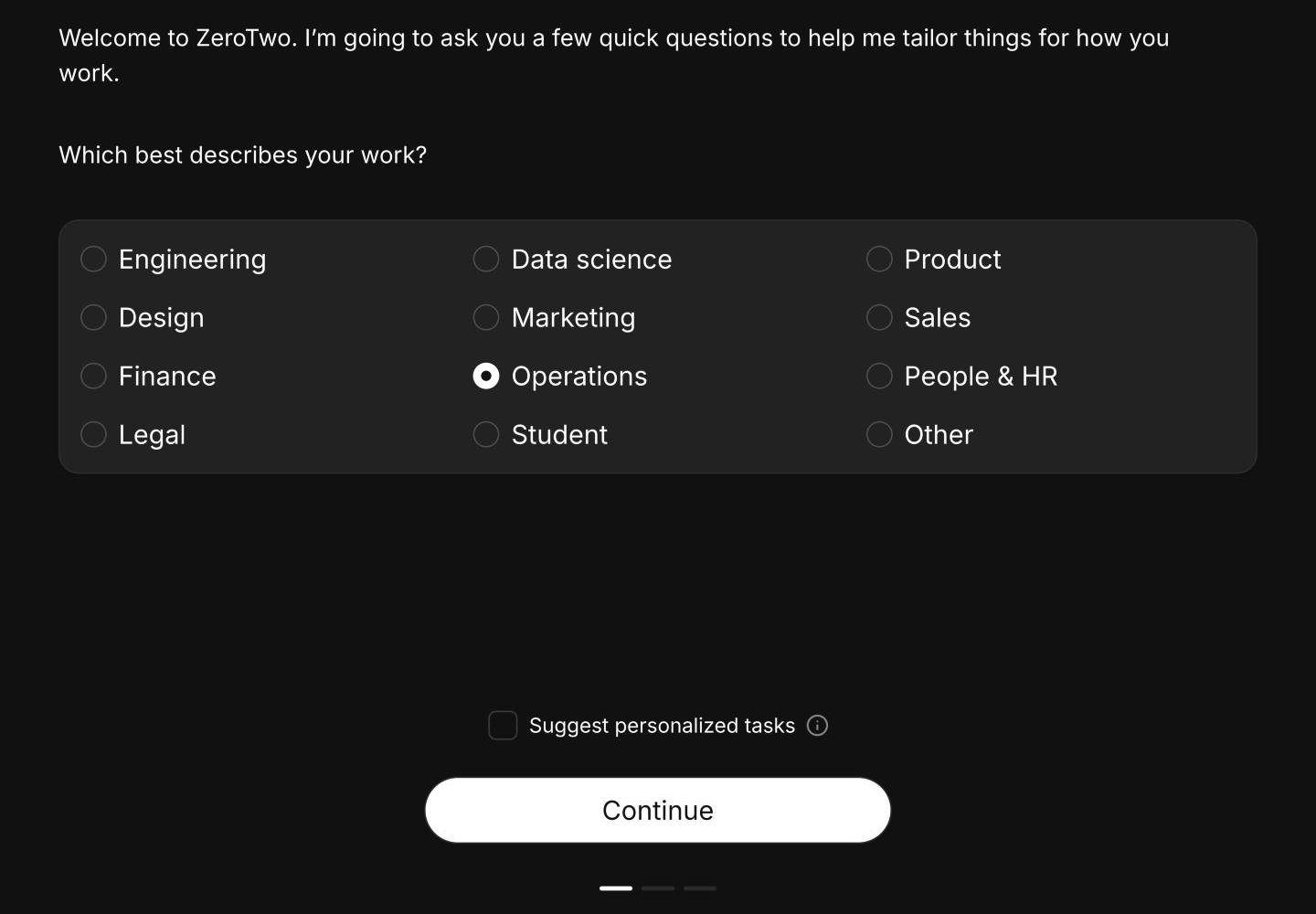
The starter tasks are not all the same kind of work. The spreadsheet task needs no connection. It draws its chart from a sample file and keeps it as a download on the web, or saves it in your Documents/ZeroTwo folder on the desktop. The calendar and Slack tasks connect their app first if needed. Then each runs as a Work task on your account's models and acts on your real calendar or Slack.2
In the desktop app the setup goes two steps further. It offers access to your computer, with a separate switch for computer use, computer history, and your Desktop, Documents, and Downloads folders. It also offers to bring over your setup, projects, and recent chats from other AI apps it finds on your computer, and to keep them in sync.
Cloud Code tasks can now end in a pull request
Code is the desktop app's mode for working in a repository. In 2.0, one "Work in" picker on the Code composer offers This computer or Cloud, with your saved environments under Cloud. ZeroTwo remembers the choice for your account and for each project.3
A cloud task can now carry a change all the way to a pull request. From the Code panel's Git actions you can commit, push, and open a pull request. Pushes always go to a branch named zerotwo/, never to the branch the task started from or to main. The Review panel lists the task's changes since it cloned the repository, under Cloud changes. A first cloud task runs in four steps:
- Choose Cloud
In the Code composer, open the Work in picker and choose Cloud with one of your saved environments.
- Give it the task
ZeroTwo clones the repository into that environment and does the work there, not on your computer.
- Review Cloud changes
Review shows the diff against the clone point. Copy git apply command brings it to your own checkout.
- Push and open a pull request
Use the Code panel's Git actions. The push goes to a zerotwo/ branch.
A follow-up picks up where the task left off, even after its sandbox has shut down. A cloud task's work is kept for 7 days after its last turn. A clone that fails, or GitHub access that has expired, now ends the run with a clear message instead of a paid turn that does nothing.
Cloud runs need a ZeroTwo model. A model you reach through your own subscription runs only on your computer, so Cloud stays unavailable until you pick a ZeroTwo model.2
Agent turns show one status line and load with less work
A long agent turn used to change its step label faster than anyone could read it. In 2.0, each turn has one status line that says what ZeroTwo is doing. Its label changes at most once a second, and the old label fades as the new one comes in.3
When a turn finishes, its steps fold into a Worked for row. A step you opened stays open when the turn folds, and when you open the row again. In a turn with 48 or more steps, ZeroTwo builds only the steps near where you are reading and fills in the rest as you scroll. The page also holds its place while you read earlier in the chat.
The same release cut the work a long chat asks of your browser. Only the reply being written is redrawn, parts of the chat far off screen are skipped, and opening a long agent chat downloads less. The numbers before and after each change, and how each was measured, are in How we made a 16,000-step chat open fast.
Availability
Today, 2.0.3 is live on the web and available in the desktop app.1
Free: the welcome setup for new accounts, the new agent-step view, and the speed work. Work and Code tasks, including the setup's calendar and Slack tasks, run on the models the Free plan includes. Open ZeroTwo
Plus, Pro, and Ultra, with their 2× versions: the same, with Work and cloud Code runs drawing on your monthly credits. See plans and credits
The desktop app on every plan: cloud Code, the desktop starter tasks, and the setup's computer access and import steps. Cloud runs take ZeroTwo models only. Download the desktop app
A starter task shows that ZeroTwo runs, not that it fits your work. Your first real assignment is the test that counts.
Footnotes
- Release state read on November 24, 2026. The web app at app.zerotwo.ai reported version 2.0.3 in production, built on November 23. The desktop 2.0.3 release, published on November 24, carries installers for Mac with Apple silicon, Windows on x64 and Arm, and Linux as AppImage and .deb. ↩
- Who sees the setup, what each starter task runs, and where Code runs, on which models and at what cost, were read from the source of the ZeroTwo 2.0.3 app on November 24, 2026, and checked against the running web app the same day. ↩
- Feature details in this post are from the ZeroTwo 2.0.0 release notes, published on November 22, 2026, at https://learn.zerotwo.ai/docs/changelog#release-2-0-0. ↩
- Captured on app.zerotwo.ai, version 2.0.3, on November 24, 2026, in one run. Existing accounts are not sent to the setup, so we opened it at its own address on an existing account and stopped before Get Started, which leaves the account unchanged. The account's name is cropped out, and the animated background is off, as it is with reduced motion. Each still was rendered at 1.6 times its on-screen size. ↩